73D41416194E8A7C390936971FB2B74B Chira Sathi

Sunday, September 25, 2011

Grab Free Full Version License of TuneUp Utilities 2011

TuneUp Utilities 2011 is one of the best and most powerful tweaking and customizing application for Windows. It keeps your Windows clean, disables unnecessary programs and gives users the best system performance. TuneUp Utilities makes your system Fast, stable and offers the best tools to customize your Windows Settings & Appearance. Its 1-Click Maintenance fixes most of the registry and PC issues in a click. This great utility is meant both for novice and experienced users.

TuneUp is running a promotion which can easily provide you a Free full-version license serial of latest TuneUp Utilities 2011. It seems TuneUp is planning to launch the new 2012 version of TuneUp Utilities next month and that’s the reason they’re offering it for FREE.
teaser_products_tuneup_utilities_features_big_en
To grab a free license -
1. Visit this promotion page. Enter a valid email address, enter your name in Retailer, input captcha code and click on the ‘Get product key’ button.
2. A pop-up will appear where you need to enter the same email again to confirm.
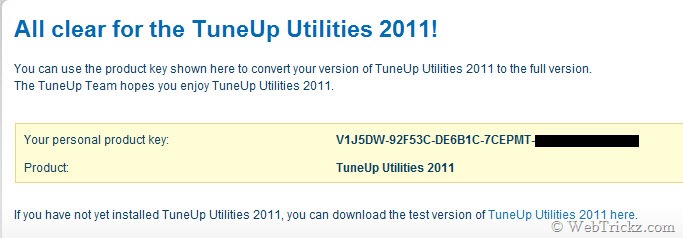
3. Check your email inbox for the confirmation e-mail sent to you. Click the link in the email to obtain your personal product key for TuneUp Utilities 2011.
19-09-2011 11-38-14
4. Download TuneUp Utilities 2011 and activate it using the license key received.
The product key works on English version of TuneUp 2011. Enjoy! :)
Thanks Raymond

How To Change File Extension

Hello Guys..On wildhacker I have written about Keylogger and Crypter in my previous articles. Today in this tutorial I will show you how to make your .exe (or .com/.scr) files look like .jpeg/.mp3 or any other filetype! By normally changing the extension to e.g .mp3, will corrupt your file, but with this exploit your file will still be executable!

So for example lets say, you have created a file server.exe using keylogger, but I want it to look like a mp3 file, so people would run it. In this case, you should change the .exe to .scr to make it look more legit in the end.


Follow the steps bellow to change the file extension..

Step 1: lets say we have server.exe, now, rename your server.scr (which is still executable) to "songname uploaded by .SCR" (notice the space).


Step 2: Now it's time to use the exploit! Open up the Character Map,


Step 3: Scroll down and find the "U+202E: Right-To-Left Override" character in Character Map,


Click "Select" and then "Copy".

Step 4: Now choose to rename your file, and paste the copied character right before the ".SCR" (press ctrl+v to paste)


Step 5: hen type "3pm" (without the " ") and press Enter. Now it should look like this:
Spoiler,


Done! Obviously you might want to change the icon to look like an mp3 before doing this..

Most browsers have patched this, but it can be used on IM's like MSN or Yahoo Messenger. To upload the file to a filehost, you need to make a .rar file with your server inside.


Now go ahead and mix around with .exe/.scr/.com and the fake-extensions to find some other legit-looking combinations!

So friends, I hope this file extension changing tutorial will be useful for you. If you have any problem in this file extension changing tutorial, please mention it in comments bellow.

Enjoy HaCkInG.........

Create a Drop Down Menu In Facebook Style With Rounded Borders

The Drop Down Menu code that I provided earlier can be used as a structure to design any navigation menu you like. I have designed a drop down menu using Facebook as inspiration. You can fully customize this menu and can add colors and fonts of your preference too. The new thing about this menu is that it also contains a sub drop down menu and all menus have rounded borders. So now you organize your pages even more beautifully. I have made the installation even more easier. If you use the watermark template or any other Blogger Designer Template then you must read the post below after applying this tutorial,
Facebook Drop down menu
Live Demo

Adding The Drop Down Menu To Blogger

     1.   Go To Blogger > Design and select a HTML/JavaScript widget
      2. Paste the following code inside it,
<style>
#mbtnavbar {
    background: #3B5998;
    width: 100%;
 
    color: #FFF;
        margin: 10px 0;
        padding: 0;
        position: relative;
        border-top:0px solid #960100;
        height:35px;
}

#mbtnav {
    margin: 0;
    padding: 0;
}
#mbtnav ul {
    float: left;
    list-style: none;
    margin: 0;
    padding: 0;
}
#mbtnav li {
    list-style: none;
    margin: 0;
    padding: 0;
      
}
#mbtnav li a, #mbtnav li a:link, #mbtnav li a:visited {
    color: #FFF;
    display: block;
   font:bold 12px Helvetica, sans-serif;
   margin: 0;
    padding: 9px 12px 11px 12px;
        text-decoration: none;
        border-right:0px solid #627AAD;
}
#mbtnav li a:hover, #mbtnav li a:active {
    background: #627AAD;
    color: #FFF;
    display: block;
    text-decoration: none;
        margin: 0;
    padding: 9px 12px 11px 12px;


}
#mbtnav li {
    float: left;
    padding: 0;
}
#mbtnav li ul {
    z-index: 9999;
    position: absolute;
    left: -999em;
    height: auto;
    width: 160px;
    margin: 0;
    padding: 0;
}
#mbtnav li ul a {
    width: 140px;
}
#mbtnav li ul ul {
    margin: -25px 0 0 161px;
}
#mbtnav li:hover ul ul, #mbtnav li:hover ul ul ul, #mbtnav li.sfhover ul ul, #mbtnav li.sfhover ul ul ul {
    left: -999em;
}
#mbtnav li:hover ul, #mbtnav li li:hover ul, #mbtnav li li li:hover ul, #mbtnav li.sfhover ul, #mbtnav li li.sfhover ul, #mbtnav li li li.sfhover ul {
    left: auto;
}
#mbtnav li:hover, #mbtnav li.sfhover {
    position: static;
}
#mbtnav li li a, #mbtnav li li a:link, #mbtnav li li a:visited {
    background: #EDEFF4;
    width: 120px;
    color: #3B5998;
    display: block;
    font:normal 12px Helvetica, sans-serif;
    margin: 1px 0 0 0;
    padding: 9px 12px 10px 12px;
        text-decoration: none;
z-index:9999;
border:1px solid #ddd;
-moz-border-radius:4px;
-webkit-border-radius:4px;
  
}
#mbtnav li li a:hover, #mbtnav li li a:active {
    background: #627AAD;
    color: #FFF;
    display: block;
  
}

#mbtnav li li li a, #mbtnav li li li a:link, #mbtnav li li li a:visited {
    background: #EDEFF4;
    width: 120px;
    color: #3B5998;
    display: block;
    font:normal 12px Helvetica, sans-serif;
    padding: 9px 12px 10px 12px;
        text-decoration: none;
z-index:9999;
border:1px solid #ddd;
    margin: 1px 0 0  -14px;
  
  
}
#mbtnav li li li a:hover, #mbtnav li li li a:active {
    background: #627AAD;
    color: #FFF;
    display: block;
}
</style>
<div id='mbtnavbar'>
          <ul id='mbtnav'>
            <li>
              <a href='#'>Home</a>
            </li>
            <li>
              <a href='#'>About</a>
           </li>
            <li>
              <a href='#'>Contact</a>
            </li>
      <li>
               <a href='#'>Sitemap ▼</a>
                <ul>
                    <li><a href='#'>Sub Page #1</a></li>
                    <li><a href='#'>Sub Page #2</a></li>
                    <li><a href='#'>Sub Page #3</a>
               
   <ul>
                    <li><a href='#'>Sub Sub Page #1</a></li>
                    <li><a href='#'>Sub Sub Page #2</a></li>
                    <li><a href='#'>Sub Sub Page #3</a></li>
                  </ul>

</li>
                  </ul>             </li>
          </ul>
        </div>

The colors and font family and size can be changed in the same way as in the previous post. The only thing you need to understand is how to control the number of link lists. The code in purple is responsible for the appearance of the first drop down menu and the highlighted yellow code controls the sub drop down menus. If you wish to increase or decrease the number of tabs then simply add or remove a code like this,
<li>
<a href="#">Tab Name</a>
</li>
Where # should be replaced with Page Link and the corresponding text should be replaced with the Tab name.
I will creating more menus using the same HTML structure. The above code is created without using any Jquery, Images or scripts. It is pure CSS and html and it will help you speed up your website load time too. Feel free to ask for any help if needed.
Best Blogger Gadgets